Demystifying DevSecOps: Achieving Secure & Efficient Software Delivery
DevSecOps integrates security into every stage of software development and operations, so applications are built, tested and deployed securely, efficiently and reliably. Instead of checking security at the end, teams automate it inside the pipeline and share responsibility for it.
Software teams face a dual challenge: deliver high-quality applications quickly, and keep them secure. This is where DevSecOps comes in, extending DevOps with security checks that run continuously rather than once before release. In this article we cover why it matters, the key components, the essential practices, the tools that support them, and how to start.
Why DevSecOps matters

In traditional models, security review happens late, often just before release. Problems found at that point are slow and expensive to fix, and they delay delivery. DevSecOps applies the idea of "shifting left": moving security checks earlier, to the moment code is written and committed, when a fix takes minutes instead of days.
The result is fewer vulnerabilities reaching production, shorter release cycles and less friction between development, security and operations teams. Security stops being a gate at the end and becomes a property of the pipeline itself.
DevOps vs DevSecOps
DevOps unites development and operations to deliver software faster and more reliably. DevSecOps keeps everything DevOps does and adds security as a shared, automated responsibility: the same pipeline that builds and deploys also scans, tests and verifies.
CI/CD: the backbone of a DevSecOps pipeline
At the heart of DevSecOps lies Continuous Integration and Continuous Deployment (CI/CD): frequent integration of code changes and automated testing, which produces a steady stream of deployment-ready software. It helps teams catch and fix issues early, shorten development cycles and deliver new features faster.
Developers commit code to a shared repository, which triggers an automated build and test process: compilation, unit tests, integration tests and end-to-end tests. Automating these steps means bugs and vulnerabilities are found quickly, which keeps both code quality and security high.
SAST vs DAST: testing security in the code and at runtime

Two testing methods do most of the work in DevSecOps: Static Application Security Testing (SAST) and Dynamic Application Security Testing (DAST). They complement each other.
SAST: analysing the code
SAST analyses source or compiled code without running it, which allows early detection of insecure coding practices, input validation flaws and insecure dependencies. Integrated into the CI/CD pipeline, it catches security issues as part of the normal development workflow, before they reach production.
DAST: testing the running application
DAST tests the application at runtime. It simulates real-world attacks by sending inputs and monitoring responses, which uncovers weaknesses that static analysis can miss, such as configuration errors, authentication flaws and injection vulnerabilities. It usually runs against deployed applications or staging environments.
Other security checks to add to the pipeline
SAST and DAST are the starting point, not the full picture. A mature DevSecOps pipeline also covers:
- Dependency scanning (Software Composition Analysis): most applications are built largely from open-source libraries. Scanning dependencies flags known vulnerabilities and licence issues before they ship.
- Secrets detection: automated checks that stop passwords, API keys and tokens from being committed to the repository.
- Container image scanning: images are checked for vulnerable packages and misconfigurations before they are pushed to a registry. See our guide to containers for what to watch for.
- Infrastructure as Code scanning: templates and configuration files are reviewed for insecure settings before infrastructure is created.
Five practices for building a DevSecOps environment
1. Security as code
Treat security as part of the development process. Keep security policies, security tests and configuration files under version control, next to the application's source code. Managing security in code form lets you automate checks and enforce standards consistently.
2. Collaboration and shared responsibility
Build a culture where development, security and operations share responsibility. Regular communication, knowledge sharing and joint decisions close the gaps between teams, so security is addressed at every stage of the software lifecycle.
3. Continuous security testing
Run security testing inside the CI/CD pipeline. Add SAST and DAST tools to your automated tests so code is examined for weaknesses on every change, and vulnerabilities are fixed while they are still cheap to fix.
4. Automation and orchestration
Use automation and orchestration tools to streamline development, testing and deployment. Automation reduces human error and applies the same security practices everywhere, while enabling faster, more frequent releases. If you run containers, our guide to Docker and Kubernetes shows how they fit into the pipeline.
5. Continuous monitoring and incident response
Monitor application logs, network traffic and system metrics in real time to detect anomalies and potential breaches. By monitoring your applications proactively, you can respond to incidents quickly, limit their impact and reduce downtime. Our cybersecurity solutions can help you structure this.
Popular DevSecOps tools
Several tools support DevSecOps practices. A few examples:
- GitLab CI/CD: a comprehensive platform that brings together code repositories, continuous integration and deployment pipelines, with built-in security scanning.
- Jenkins: an extensible automation server for continuous integration and delivery, with a vast plugin ecosystem for integrating security testing tools.
- OWASP ZAP: an open-source web application security scanner that finds vulnerabilities through dynamic analysis.
- SonarQube: a code quality and security analysis tool that plugs into CI/CD pipelines to report vulnerabilities, bugs and code smells.
- Azure DevOps: a cloud platform for development, testing and deployment, including Azure Pipelines for CI/CD workflows and Azure Security Center for continuous security monitoring.
No tool does the job alone. Choose tools that fit your stack and integrate with your pipeline, and prefer a few well-used ones to a long list nobody maintains.
Azure Pipeline flow: where security testing fits
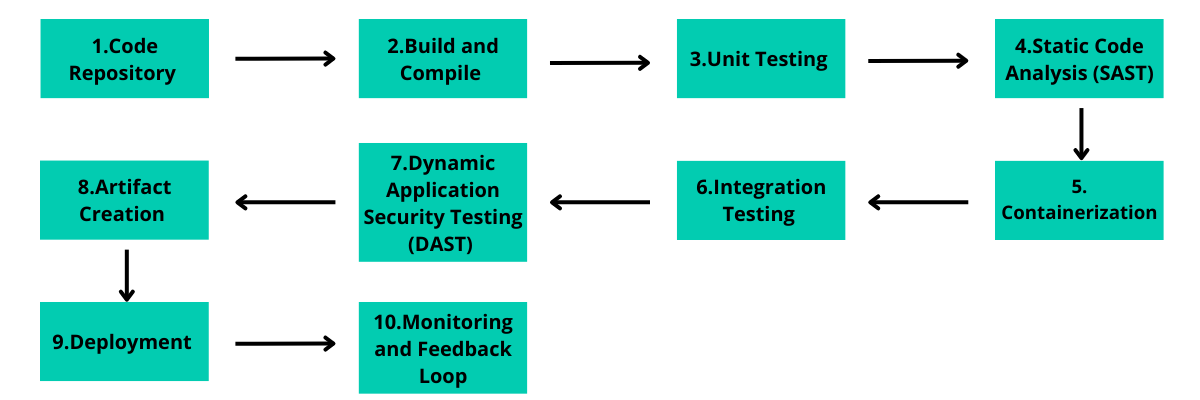
The flow chart above shows a simplified Azure Pipeline: code changes are continuously built, tested and deployed, with security testing at several stages to keep delivery secure end to end.
Common mistakes when adopting DevSecOps
- Buying tools before changing habits. Scanners without shared ownership just produce reports nobody acts on.
- Blocking every build on every finding. Start by failing builds only on critical issues, then tighten the rules as the team adapts.
- Ignoring false positives. Untuned scanners create noise and teams stop trusting them. Review and tune rules regularly.
- Treating security as the security team's job alone. Developers need the training and feedback to fix issues themselves.
- Not measuring. Track metrics such as time to fix vulnerabilities and deployment frequency. Our article on DevOps metrics that matter is a good starting point.
How to start with DevSecOps
- Map your current pipeline and identify where security checks happen today, if at all.
- Add one quick win first, such as secrets detection or dependency scanning, in a single project.
- Introduce SAST in the CI stage and DAST against staging.
- Define clear rules for which findings fail a build and who fixes what.
- Train the team, measure results and extend the practice to other projects.
Making security part of every release
DevSecOps is not a buzzword; it is a shift in how teams deliver software. By combining continuous integration, security testing and automation, organisations build a culture of collaboration, shared responsibility and innovation. Start small, choose the tools that fit your stack, and expand from there. Each automated check makes the next release safer and faster.
At Syone, our DevOps and cybersecurity teams help organisations design and run secure delivery pipelines, from the first automated scan to a full DevSecOps practice. Get in touch to talk about your pipeline.